Pinterest SEO: How to Make Your Pins More Discoverable
Pinterest works like a visual search engine. Keywords, titles, descriptions, visuals, boards and landing pages: a step-by-step method to get your Pins found by the right people.

Most people on Pinterest are not scrolling to kill time: they are looking for an idea for a specific project. This week’s dinners, a kitchen makeover, a gift list, a content calendar for their business. That intent is what makes Pinterest such a strong traffic channel for bloggers, creators and small businesses — as long as your Pins show up when someone types the right words.
This guide explains how Pinterest understands a Pin, how Pinterest SEO differs from Google SEO, and how to optimize every element — keywords, title, description, visual, board and landing page — with a method you can apply to your very next Pin.
Pinterest is a visual search engine
Pinterest is often filed under social media. In practice, it behaves much more like a search engine: someone types a query, Pinterest shows the Pins it considers relevant, and that person saves or clicks the ones that match what they need.
Your Pins can be discovered in several places:
- search results, when someone types a query in the search bar;
- the home feed, where Pinterest suggests ideas based on each person’s interests;
- related ideas, shown below a Pin someone is viewing;
- the boards of people who saved your Pin.
In every case, Pinterest first needs to understand what your Pin is about before it can show it to the right people. That is the whole point of Pinterest SEO: making the topic obvious, both to the platform and to the person scrolling through results.
Pinterest SEO vs. Google SEO: what actually changes
Both share the same logic — answering a search — but they don’t rank the same thing, and they don’t rely on the same elements.
| Criterion | Pinterest SEO | Google SEO |
|---|---|---|
| What gets ranked | A Pin: an image or video, with a title, a description and a link | A full web page |
| What you optimize | The visual, the Pin’s text, the board, the linked page | The page content, its structure, technical aspects, the links pointing to it |
| Type of query | Often short and exploratory: ideas, inspiration, “how to” | Highly varied: precise questions, comparisons, purchases, information |
| Role of the image | Central: it is what makes people click | Secondary for ranking a standard page |
| End goal | Earn the save and, above all, the click to your site | Earn the click from the results page |
In practice, a blog post that ranks well on Google is not enough to perform on Pinterest: it also needs Pins whose visuals and copy speak the language of Pinterest search. Conversely, a great Pin won’t save a weak page once the click happens. The two efforts work together: Pinterest drives discovery, your page does the rest.
How Pinterest understands a Pin
A Pin is more than an image. Pinterest has several signals to work out its topic, and you control most of them.
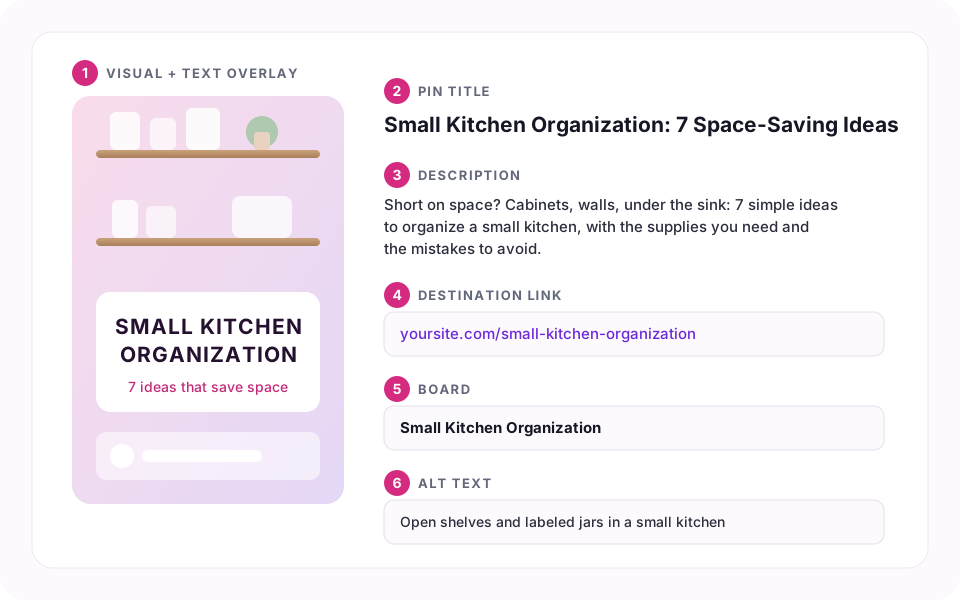
- The visual: what the image shows and the text you overlay on it.
- The title of the Pin.
- The description.
- The destination link and the content of the page it leads to.
- The board the Pin is saved to, with its name and description.
- The alt text, which describes the image for people using a screen reader.
The goal is not to repeat the same keyword everywhere, but for all these elements to tell the same story. When the visual, title, description, board and page all talk about “small kitchen organization”, there is no doubt about what the Pin is for.
Step 1: find the right keywords
Everything starts with the words your audience actually types. Here is a simple method that doesn’t require any paid tool.
Start from your reader’s problem
Before thinking “keywords”, put into words the need your post answers. Not “my new recipe”, but “a quick, healthy weeknight dinner”. Not “my template”, but “planning your content calendar”. Those are the phrasings people search for.
Explore the Pinterest search bar
Type your post’s main topic into the search bar without pressing enter, and look at the suggestions that appear. They reflect searches people actually run on the platform. Then run the search: Pinterest often shows suggestions to refine the query just below the bar. Write down the ones that match your content.
Check seasonality with Pinterest Trends
Pinterest Trends(opens in a new tab) is a free tool from Pinterest, available in many countries. It shows how interest in a search evolves over the year. It is especially useful for seasonal topics (back to school, holidays, gardening, weddings…): you’ll see when interest starts to rise, and therefore when to publish.
Organize your keywords
For each post, decide on:
- one primary keyword describing the core topic;
- two to four secondary keywords: variations, refinements, synonyms;
- different angles to create several Pins for the same post.
| Role | Example | Where to use it |
|---|---|---|
| Primary keyword | small kitchen organization | Title, start of the description, board name |
| Secondary | kitchen cabinet organization | Description, second Pin |
| Secondary | kitchen storage ideas | Text overlay of a third Pin |
| Angle | renter-friendly kitchen storage | A dedicated Pin for renters |
Step 2: write a title that matches the search
The title is one of the most explicit elements of your Pin. It can be up to 100 characters long, but a short, clear title reads better — especially on mobile, where it may be truncated.
A few principles:
- put the primary keyword first, or as close to the start as possible;
- state the concrete benefit: what the person will find when they click;
- stay true to the page — a misleading title might earn a click, but it disappoints;
- write for a human: a natural phrase beats a string of keywords.
| Before | After |
|---|---|
| Tip of the day | Small Kitchen Organization: 7 Space-Saving Ideas |
| My Sunday routine | Sunday Meal Prep: 5 Recipes for the Week Ahead |
| New template! | Free Editorial Calendar Template to Plan Your Blog |
Step 3: write a useful description
The description (up to 500 characters) complements the title. It is the right place to work in your secondary keywords naturally and to spell out what your page offers.
A simple structure works well:
- one sentence restating the need (“Short on kitchen space?”);
- one or two sentences on what the page delivers, with the primary keyword and one or two secondary keywords;
- a gentle nudge to read on (“All the ideas and supplies are in the post”).
Step 4: let the visual do the talking
On Pinterest, the image does the first job: it is what stops the scroll. A search-friendly visual is one whose topic is clear in a second.
Pick the right format
Pinterest recommends a vertical 2:3 format, for example 1000 × 1500 pixels. A vertical Pin takes up more room in the results than a square or horizontal image, without the risk of being cropped like an overly tall one.
Put the topic on the image
The text overlay should echo your title in a few words that are readable on a phone screen: a bold typeface, strong contrast with the background, and no more than two or three levels of text.


Add alt text
Alt text describes what the image shows for people with visual impairments. Describe the scene plainly instead of pasting your title: “Open shelves and labeled jars in a small kitchen” is far more useful than “kitchen organization small kitchen storage ideas”.
Step 5: build focused boards
Boards help Pinterest — and anyone visiting your profile — understand how your content is organized.
- Name boards the way people search: “Small Kitchen Organization” rather than “My Ideas ❤️”.
- Write a short description for each board, including its primary keyword.
- Save each Pin to its most relevant board first, the one whose topic matches exactly.
- Use sections to split a broad theme (for instance “Cabinets”, “Countertops”, “No-Drill”).
Step 6: take care of the landing page
The click is not the finish line. If the page doesn’t deliver on the Pin’s promise, people leave right away — and the value of that traffic is lost.
- The promise must match: a “7 storage ideas” Pin should lead to a page that actually presents those 7 ideas.
- The page must work well on mobile: Pinterest is used heavily on phones, so make sure your page is comfortable to read there.
- Fill in your page metadata (title, description, social image). It powers Rich Pins, which automatically pull information from your site, and every share on social platforms.
- Claim your website from a Pinterest business account: your Pins will be attributed to your domain and you’ll get more complete analytics.
Publish consistently instead of all at once
Publishing fifty Pins in one evening and then nothing for a month is rarely the best strategy. A steady rhythm lets you test angles, feed your boards over time and keep a pace you can sustain.
- Create several Pins for the same post, with different visuals and angles: an “ideas list” Pin, a “before / after” Pin, a Pin for a keyword variation. Favor new visuals over re-pinning the exact same Pin: each one is a fresh chance to reach different searches.
- Plan ahead for seasonal topics: publish before interest peaks, using Pinterest Trends as a guide.
- Schedule your Pins to spread that rhythm without thinking about it every day.
Measure, then adjust
With a business account, Pinterest analytics show each Pin’s impressions (how many times it was displayed), saves and outbound clicks to your site. Give your Pins a few weeks before drawing conclusions: results on Pinterest rarely build up in a few days.
| What you see | What to explore |
|---|---|
| Few impressions | The keyword may be too vague or rarely searched: revisit the title, description and board |
| Many impressions, few clicks | The visual or title isn’t compelling: test a new, more explicit visual |
| Saves but few clicks | The Pin inspires but gives no reason to click: make the page’s promise clearer |
| Clicks, but visitors leave quickly | The page doesn’t deliver on the Pin’s promise, or displays poorly on mobile |
The most common mistakes
- Publishing a Pin without a title or description, relying on the image alone.
- Choosing keywords that are too broad (“kitchen”) and say nothing about your angle.
- Using a horizontal visual, or text too small to read on a phone.
- Saving every Pin to one catch-all board.
- Linking to a page that doesn’t match the Pin’s promise.
- Judging a Pin after two days instead of giving search time to do its job.
Your pre-publishing checklist
Conclusion
There is nothing magical about Pinterest SEO: it is about making the topic of every Pin obvious, from keyword research all the way to the landing page. The creators who grow the most are rarely the ones who publish the most in one go, but those who apply this method consistently, watch their analytics and adjust.
If you publish a lot, the most time-consuming part is usually production: designing several visuals per post, writing consistent titles and descriptions, then scheduling it all. That is exactly what AutoPins helps with, starting from your blog posts. You stay in control of every word and every visual — the method remains yours.
To go further, browse all our guides in the Pinterest, SEO & Growth topic.